
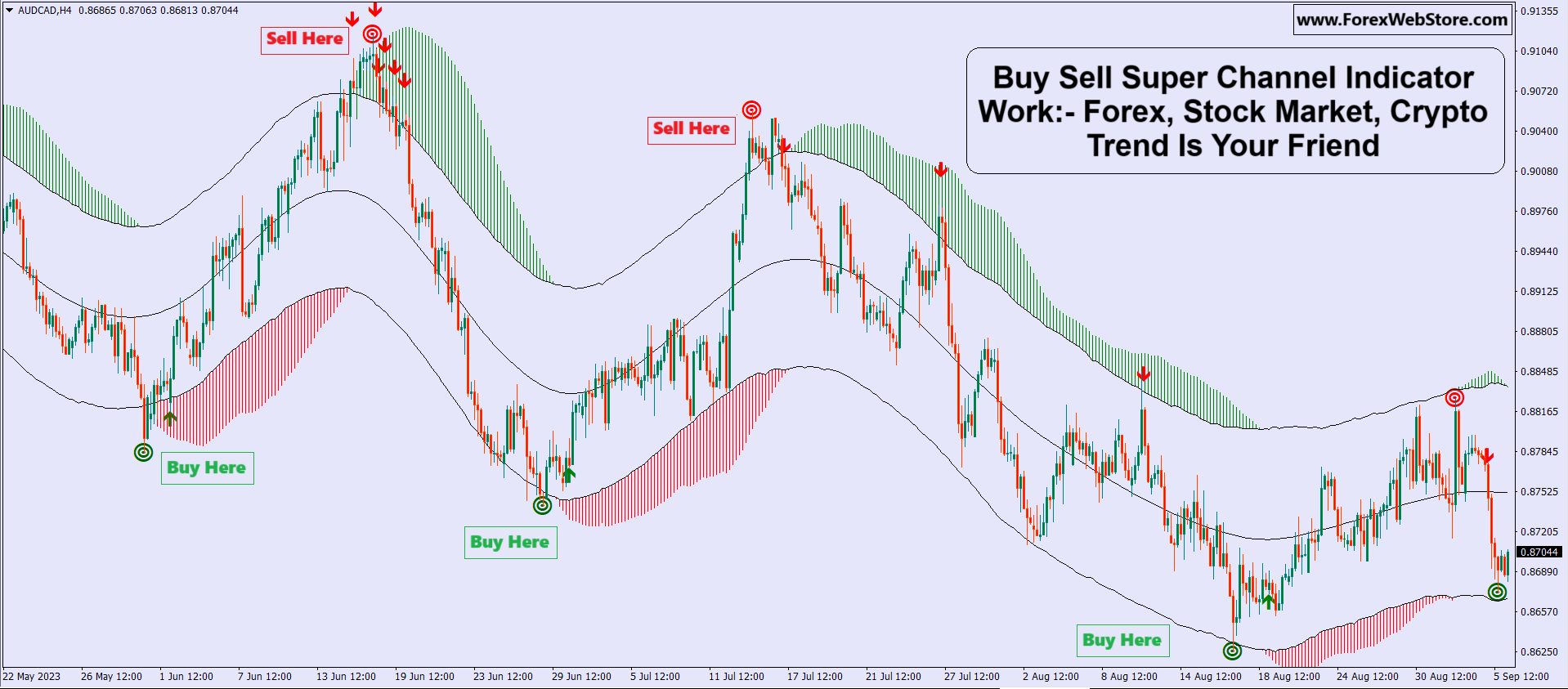
Buy Sell Super Channel Indicator


Original price was: $1,149.00.$239.00Current price is: $239.00.
- Original Indicator
- Trading time: Every time
- Instant Download in Zip file
- Arrows Popup Sound Alerts
- Timeframe: M5,M15, M30, H1,H4,D1
- Use on unlimited MT4 accounts
- Type of strategy: Scalping and Long term
- Built for Metatrader 4 (MT4 for PC and Laptop, MT4 for MAC)
- Works on Forex (all pairs), Commodities, Stocks, Metals, Gold…
- Recommended Broker: ICMARKET EXNESS
- Customer Support & Free Upgrades For Life Time
Introduction
In trading (Forex, Stocks, and Crypto), identifying the right entry and exit points is crucial. The Buy Sell Super Channel Indicator is a powerful trend-following tool that helps traders spot clear buy and sell signals based on market direction.
This indicator is especially useful for beginners because it visually shows:
-
Trend direction
-
Entry signals
-
Exit points
This is our best Forex Trading Indicator.
100% Non-repaint Indicator and accuracy 92%+
This is the world’s best Indicator for Scalping.
Its name “Buy Sell Super Channel Indicator”
This indicator is very easy to use for beginners And fully automatic.
It Will Never Expire And There Are NO “Monthly Fees”
Or NO Any Other Recurring Charges For Use
File Type And Requirements:-
This Is A Digital Item! (Download Links–Zip File)
You Will Need: MT4 Terminal
This Files You’ll Get Is ZIP Archive.
Indicator Installation Service is Free:- If you don’t know how to install the indicator. Contact Us, We will install the mt4 Indicator on your Pc/Laptop with TeamViewer software and If any person wants a live chart screenshot of any indicator, any time frames and any Chart then he can contact us anytime.
What is Buy Sell Super Channel Indicator?
The Buy Sell Super Channel Indicator is a technical analysis tool that combines:
-
Moving averages
-
Trend channels
-
Buy/Sell signal alerts
It creates a channel (upper and lower bands) around price and highlights:
-
Green zone → Uptrend (Buy)
-
Red zone → Downtrend (Sell)
How the Indicator Works
1. Trend Identification
-
When the channel turns green, the market is in an uptrend
-
When the channel turns red, the market is in a downtrend
2. Buy Signal
-
Appears near the bottom of the channel
-
Usually marked as “Buy Here”
-
Best used when trend is turning from red → green
3. Sell Signal
-
Appears near the top of the channel
-
Marked as “Sell Here”
-
Best used when trend shifts from green → red

HOW TO USE:-
FOR SELL ENTRY:-
- First made Red Circle on the top.
- Second, made First Red Arrow on the top. Two Confirmations were made after taking Instant Sell Entry.
- Always remember, Trend is your friend so don’t violate these Indicator Rules. This Indicator provides red/green Signal.
- This Indicator is Best for Manual Scalping, M5 and M15 time frames are best working for scalping.
- Trend according, you can take TP/SL(1:2 or 1:3 will be TP/SL). If Trend according to this indicator provides the first red arrow then you can go easily 1:3 ratio for a Sell trade.
- If you have candlestick knowledge you can make a lot of money with this indicator. When made indicator Red Dot( According to Indicator rules) after confirmation made bearish power candlestick like- The Shooting star, Bearish Engulfing crack, Bearish Engulfing sandwich, Evening Star, Tweezer Top, Dark Cloud Cover, Shrinking candles, Hanging man Etc. Bearish Candlestick confirmation made after taking the Instant Sell entry.
FOR BUY ENTRY:-
- First made Green Circle on the bottom.
- Second, made First Green Arrow on the bottom. Two Confirmations were made after take Instant Buy Entry.
- Always remember, Trend is your friend so don’t violate these Indicator Rules. This Indicator provides red/green Signal.
- This Indicator is Best for Manual Scalping, M5 and M15 time frames are best working for scalping.5. Trend according, you can take TP/SL(1:2 or 1:3 will be TP/SL).
- Trend according to this indicator provides the first green arrow then you can go easily 1:3 ratio for Buy trade.
- If you have candlestick knowledge you can make a lot of money with this indicator. When made indicator Green Dot(According to Indicator rules) after confirmation made bullish power candlestick like :- The Hammer, Bullish Engulfing Crack, Bearish Engulfing Sandwich, Morning Star, Tweezer Bottom, Piercing Line Etc. Bullish Candlestick confirmation made after taking Instant Buy entry.
How to Use Buy Sell Super Channel Indicator (Step-by-Step)
Step 1: Identify the Trend
-
Only take Buy trades in uptrend (green)
-
Only take Sell trades in downtrend (red)
Step 2: Wait for Signal
-
Do not enter randomly
-
Wait for:
-
Buy signal in green zone
-
Sell signal in red zone
-
Step 3: Confirm the Trade
Use additional confirmation like:
-
Support & Resistance
-
RSI (Relative Strength Index)
-
Candlestick patterns
Step 4: Entry
-
Enter trade after signal candle closes
Step 5: Stop Loss
-
For Buy → below recent low
-
For Sell → above recent high
Step 6: Take Profit
-
Next resistance (for buy)
-
Next support (for sell)
-
Or use risk-reward ratio (1:2 or 1:3)

Best Strategy Using This Indicator
Trend-Following Strategy
✔ Trade only in direction of trend
✔ Ignore signals against trend
Example:
-
If channel is green → only buy
-
If channel is red → only sell
Pullback Strategy
-
Wait for price to retrace inside channel
-
Enter when signal appears again in trend direction
Advantages
-
Easy to understand (beginner-friendly)
-
Clear buy/sell signals
-
Works on Forex, Crypto, Stocks
-
Helps identify strong trends
Pro Tips for Better Results
-
Always use higher timeframe (H1, H4, Daily)
-
Combine with RSI or MACD
-
Avoid trading in low volatility / sideways market
-
Follow proper risk management
Best Timeframes
-
Scalping → M5, M15
-
Intraday → M15, H1
-
Swing trading → H4, Daily
Conclusion
The Buy Sell Super Channel Indicator is a powerful and simple tool for identifying trends and trading opportunities. While it provides clear signals, it should always be used with proper confirmation and risk management.
👉 Remember:
“Trend is your friend” — follow the trend, don’t fight it.
Thank You ❤️
1 review for Buy Sell Super Channel Indicator
Add a review
Related products


MT4 Indicator




MT4 Indicator
Smart Market Structure Concepts V10 Forex Indicator MT4 |100% Non Repaint Indicator V10.0


Poonam Kumari –
Nice Indicator and i am working M1 Timeframe. indicator working very well o love it thanks for sharing